Read the Finance screen
Owner only
Checked on app version 1.7
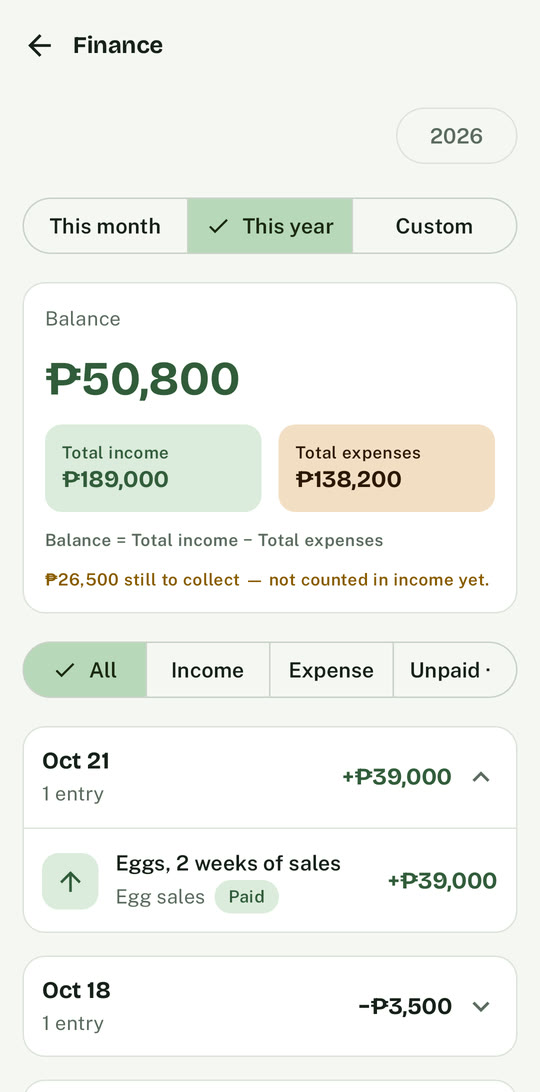
Finance shows your balance, income and expenses for a period, and every entry behind them.
Open it
Open the Farm tab and tap Finance. Workers do not see Finance.
Choose the period
At the top, choose This month, This year or Custom. A button above them, for example 2026, lets you pick another year.
The numbers
- Balance is your Total income minus your Total expenses. The card says so: "Balance = Total income − Total expenses".
- Total income is money you have received.
- Total expenses is what you spent.
If a buyer has not paid yet, a note says how much is still to collect, for example "₱26,500 still to collect — not counted in income yet". It is counted when you record the payment. See Paid, partly paid and unpaid.
The list
Below the numbers, choose All, Income, Expense or Unpaid (with a number when some are unpaid). Entries are grouped by day. Tap a day to open or fold it, and tap an entry to see its details.
Where entries come from
- Sales you record. See Record a sale.
- Income and expenses you add. See Add income or expense.
- Supply purchases, which appear here automatically when you put stock in. Using supplies never adds another expense.