Read the Today screen
All
Checked on app version 1.7
Today shows what needs doing first. Here is what each part means.
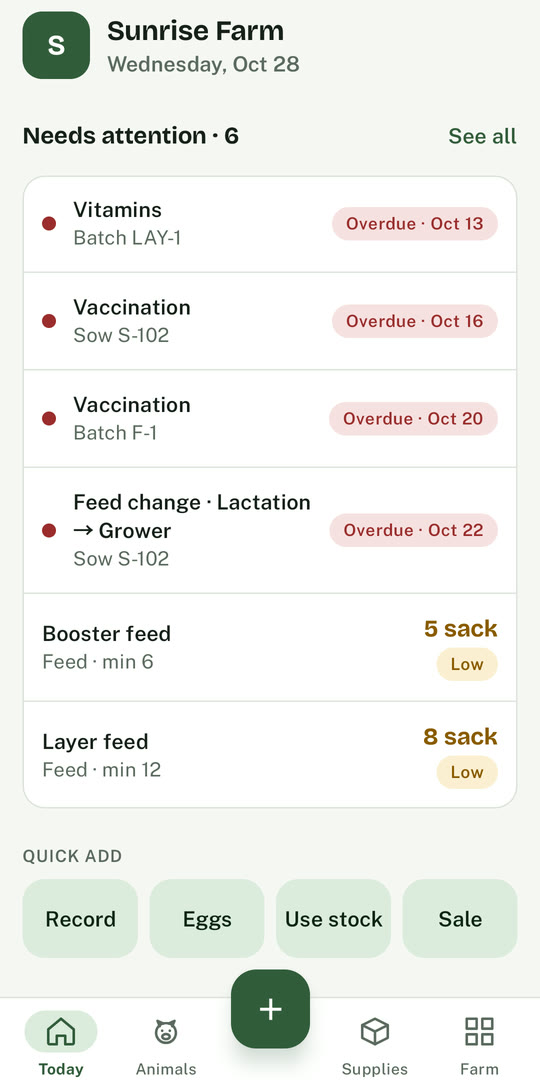
Needs attention
At the top, Needs attention lists what is waiting for you, with a number next to it. Tap See all to see the full list.
- A red label such as Overdue · Oct 13 means a task passed its date and is not done yet.
- An amber label such as Low means a supply is below the minimum you set. It shows how much is left, for example 5 sack.
- If nothing is waiting, it says Nothing overdue or due this week.
Quick add
Four buttons for the work you do every day: Record, Eggs, Use stock and Sale. See Quick add.
Farm at a glance
Further down, small boxes show your Active animals, with how many of each kind.
- Owners also see the Balance this year (money in and money out).
- Workers see Due this week instead, with how many are overdue.
Recent sales and Done today
- Owners see Recent sales, the latest sales and whether each is Paid or Pending. Tap Finance to see them all.
- Workers see Done today, what they finished today. If nothing is recorded yet, it says Nothing recorded yet today. Tap Records to see more.
Other cards you may see
- Set up your care programs: pick the animals you keep so FarmTrack can schedule their care.
- Over the Free plan: your farm has more animals or batches than the Free plan allows. Your records are safe. Tap See Pro plans to look at options.
- New in FarmTrack: a kind of animal your farm can now track. Tap Add to my farm, or Not now to leave it.