Search and filter
All
Checked on app version 1.7
Find one animal or batch quickly, or narrow the list to what you want to see.
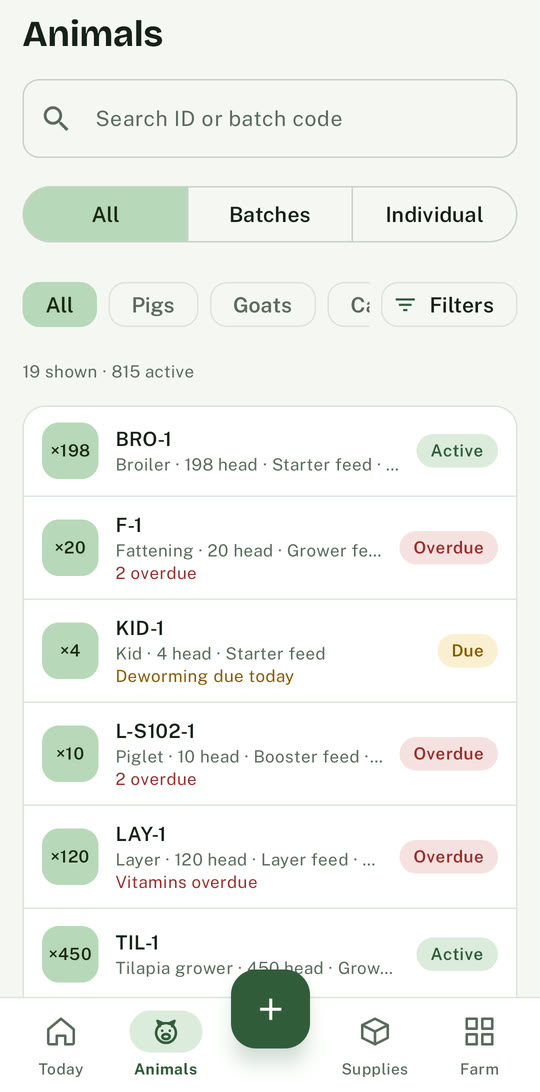
Search
Type in the box at the top, Search ID or batch code. The list shrinks as you type.
Show only batches or only individuals
Under the search box, choose All, Batches or Individual.
Show one kind of animal
Below that, a row of chips lets you pick All or one kind, such as Pigs or Goats. Slide the row sideways to see more kinds.
More filters
Tap Filters. A sheet opens with three groups. Tap Done when you have chosen.
- Type: one type only, such as Sow, Piglet, Layer or Tilapia grower.
- Status: In herd is chosen to begin with, so only animals you still have are shown. Choose another to look at others, for example Sold, Dead, Removed, Gestation or Lactating.
- Pets: With pets, Hide pets or Only pets.
If nothing matches, FarmTrack says No matches and suggests trying a different filter or search.
Reading the list
- The line under the title says how many are shown and how many are active, for example "19 shown · 815 active".
- A batch shows its head count in the green square, for example ×198, and an animal shows its photo or icon.
- On the right, a label shows its state: Active, Due (a task is due soon) or Overdue (a task is late). A line under the name says which task.