Read an animal or batch page
All
Checked on app version 1.7
Tap an animal or batch to see its details, records, supplies and money in one place.
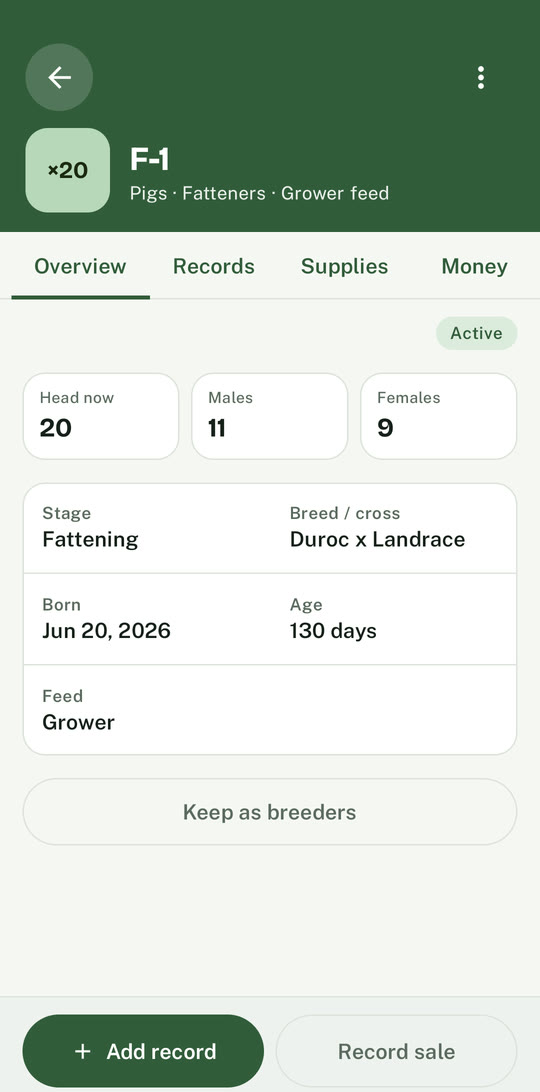
The tabs
Both pages have tabs under the title. Slide the row sideways if you do not see them all.
- Overview: the basics. An animal shows Weight, Age and the number of Records, then its Breed, Sex, Born, Current weight, Pen, Dam and Sire, and what is Next up. A batch shows Head now, Males and Females if you entered them, its Stage, Breed / cross, Born, Age and Feed, and the care Programs it follows.
- Eggs: for a laying flock, the eggs collected. See Collect eggs.
- Records: the records for this animal or batch. See Add a record.
- Supplies: the feed and care used on it. See Stock out.
- Money: its sales and costs. For a batch this can show the profit, the total costs and the cost per kilo sold. Owners see this.
- Breeding: for a female that breeds, her breeding history and cycle.
The buttons at the bottom
For an animal or batch still on the farm: Add record and Record sale. A batch of fatteners may also show Keep as breeders.
The menu
The three dots at the top open a menu.
- An animal: Edit details and photo, Change type, Change status, Remove from farm and Delete (added by mistake), shown in red. Change type and Remove from farm appear only while it is still on the farm. Remove from farm and Delete (added by mistake) are for the owner; workers do not see them.
- A batch: Edit batch (while it is Active), Change stage (only when the batch has a next stage, for example Kid to Goat fattening) and Change status. A batch of laying hens has no next stage, so it shows only the first and last.
Status
The label at the top right says where it stands, such as Active. See Change type or status.