Stock out (using)
Record supplies you used, so the stock on hand is right and each batch's feed and care cost is counted.
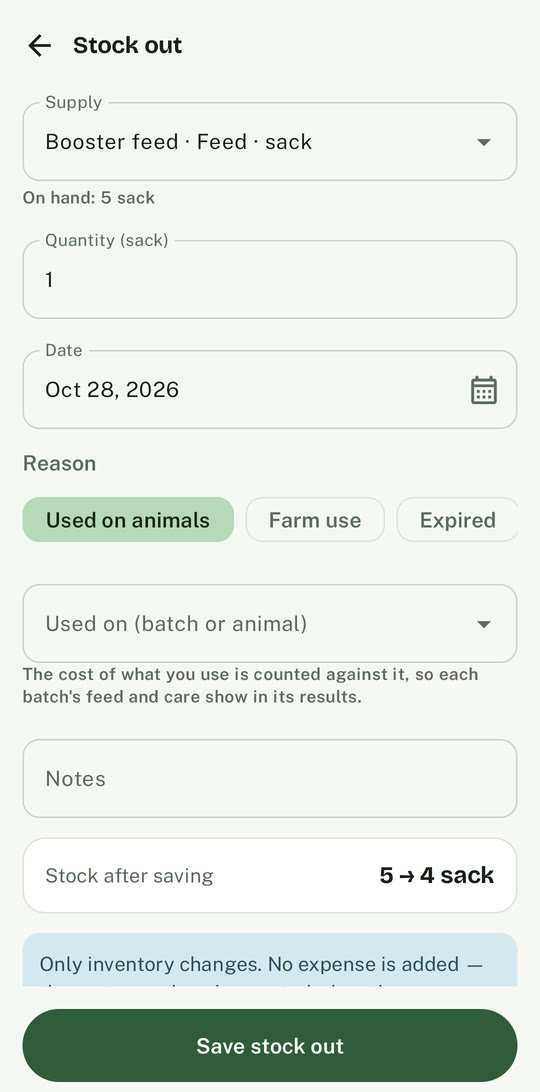
Steps
Open Supplies and tap Stock out. On Today you can also tap Use stock, or the big green + and Use supplies.
Pick the Supply. It shows how much is on hand.
Enter the Quantity, in the item's unit.
Check the Date. It cannot be a day in the future.
Choose the Reason: Used on animals, Farm use, Expired, Damaged or Other.
For Used on animals, choose Used on (batch or animal). This is required.
If you like, add Notes.
Look at Stock after saving, for example 5 to 4 sack, then tap Save stock out.
When you started from the green +, FarmTrack then opens that supply's page, where the stock out shows in its history.
Why name the batch or animal
The cost of what you use is counted against the batch or animal, so each batch's feed and care show in its results. Without it, the cost cannot be shown where it belongs.
If no batch or animal is listed
FarmTrack says there is no active batch or animal yet. Add one first, or choose another reason such as Farm use.