Stock in (buying)
Record supplies you bought or received, so the stock on hand and your expenses stay right.
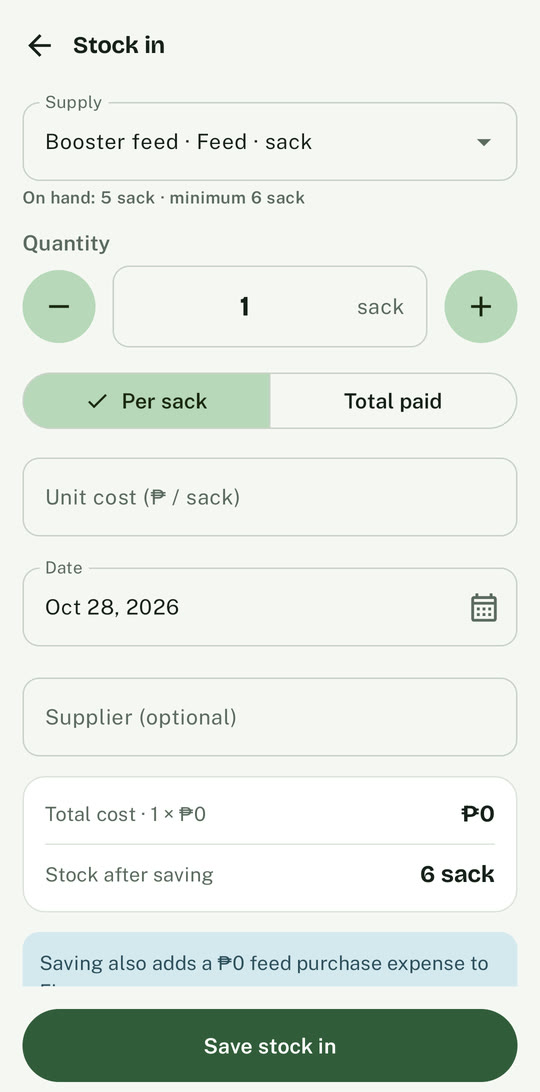
Steps
Open Supplies and tap Stock in. You can also tap the big green + and choose Stock in.
Pick the Supply. It shows how much is on hand and the minimum.
Set the Quantity. Use the + and - buttons or type the number.
Owners: choose Per sack (or the item's unit) and enter the Unit cost (₱ / sack), the price of one. Or choose Total paid and enter what you paid for the whole amount. FarmTrack works out the price of one.
Check the Date. It cannot be a day in the future.
If you like, add the Supplier (optional).
Look at Total cost and Stock after saving, then tap Save stock in.
When you started from the green +, FarmTrack then opens that supply's page, where the new stock shows in its history.
What happens to the money
For owners, saving also adds an expense to Finance for the total cost, in the item's category (for example a feed purchase). You do not enter that expense again.
If the supply is not in the list
Add it first. See Add a supply item.